



Contents:
Managing hundreds of laptops, smartphones, and IoT devices is no easy task – especially with remote work on the rise. The best Unified Endpoint Management (UEM) software turns chaos into control.
By bringing endpoint management into a single platform, UEM simplifies IT operations, boosts security, and keeps devices up to date effortlessly. Whether you’re dealing with device sprawl or striving for compliance, these tools are a lifeline for modern IT teams and MSPs.
This guide compares the best unified endpoint management software for 2026 across 10 tools, with October 2026 pricing, platform coverage, and the trade-offs that come up again and again in user reviews.
The bottom line
- Heimdal XDR platform for security-led teams that want patching, privilege management, application control, and threat prevention in one console. It isn’t a full UEM, so most teams run it alongside Intune or another MDM for phones.
- Microsoft Intune for organisations already on Microsoft 365 E3 or E5, where the licence is paid for and the July 2026 bundle narrows several old gaps.
- Omnissa Workspace ONE for large enterprises with mixed, frontline, and virtual desktop estates that need broad device coverage.
- ManageEngine Endpoint Central for cost-conscious mid-market teams and regulated organisations that need an on-premises option and published starting prices.
- Ivanti Neurons for UEM for existing Ivanti customers who want endpoint management tied to Ivanti ITSM, and who have mature patch governance.
- IBM MaaS360 for mobile-heavy and regulated organisations that want SaaS management with mobile threat defence.
- NinjaOne for mid-market IT teams that want RMM-style PC management and MDM in one SaaS console.
- Tanium for very large enterprises and government bodies that want real-time visibility shared between IT and security.
- HCL BigFix for large regulated estates with a wide spread of server, desktop and UNIX systems.
- Jamf for Apple-heavy organisations and education.
How endpoint management changed between 2021 and 2026
Unified endpoint management software lets an IT team enrol, configure, patch, monitor, and support Windows, macOS, Linux, ChromeOS, iOS, Android, and rugged devices from one console and one policy model. The category grew out of two separate lines of tooling. Mobile device management (MDM) appeared around the iPhone and BYOD, then grew into enterprise mobility management (EMM). PC lifecycle tools such as ConfigMgr, BigFix, and Ivanti Endpoint Manager handled imaging, patching and software distribution in parallel. The two merged once Windows 10 and macOS exposed MDM APIs.
The labels have moved again since then. Gartner stopped publishing its Magic Quadrant for unified endpoint management tools after the 2021 edition. On 5 January 2026 it published its first Magic Quadrant for Endpoint Management Tools. Gartner’s companion Critical Capabilities report scores vendors against four use cases:
- Unified Endpoint Management
- Autonomous Endpoint Management (AEM)
- Security-Centric Management
- Frontline Device Management
Forrester now calls its evaluation “Endpoint Management Platforms.” Both changes point to the same shift. UEM is merging with patch and vulnerability remediation, digital employee experience (DEX) metrics, and AI-assisted automation.
Market estimates vary with scope. Mordor Intelligence puts the UEM market at $8.72B in 2026, and Grand View Research puts it at $10.0B for the same year. The scope of each estimate differs, including whether services and adjacent patching or RMM tooling are counted, so treat both as directional.

Where traditional endpoint management falls short
Most mid-market estates didn’t choose their endpoint stack in one go. They added an MDM for phones, a PC management tool, a patching product, a remote support tool, and a scripting tool over several years. Each one made sense when it was bought.
Agent Fatigue. The result is several privileged agents on every laptop and server. The technical cost is a larger footprint, because each agent runs with system rights and each management server is a privileged system in its own right. CISA’s Known Exploited Vulnerabilities catalog has listed endpoint-management servers several times in 2025 and 2026, and the Ivanti entries covered in that vendor’s profile below are the clearest recent case. The human cost grows faster. Every extra agent is another console to check, another update cycle to track, and another alert stream to triage. That load outpaces headcount, and a three-person IT team feels it first.
Third-party patch management gaps. OS updates are usually handled. Browsers, PDF readers, runtimes, and line-of-business apps are where backlogs build, and a patch report that shows “pending” or “failed” across half the fleet doesn’t satisfy an auditor.
Uneven OS depth. A console that handles Windows well may treat macOS as an afterthought. Apple specialists such as Jamf and large-estate tools such as Tanium and BigFix still sell well because generalist depth varies by platform.
Add-on creep. The headline per-device price often excludes remote control, third-party patching, DEX analytics, or endpoint privilege management. Ask for a quote that includes every add-on you need before you sign.
Why we start from security and then manage the device
We built Heimdal as a security platform first, and endpoint management grew from there. Patching, privilege control, application control, and remote access sit in the same console as DNS security, next-gen antivirus and threat hunting. An unpatched app, a local admin account, and a malicious domain can all feature in the same incident, so we keep them together.
We’re not a full UEM. We don’t offer iOS or iPadOS MDM with Automated Device Enrollment, configuration profiles, or a managed app store. If phones and tablets are a large part of your estate, you’ll run us alongside Intune, Jamf, or another MDM.
You can buy from us in three ways:
- As standalone products. Every module, including Patch and Asset Management, DNS security, privileged access management, endpoint protection, and email security, can be bought on its own.
- As our unified security platform. Use as many modules as you need under one agent and one console.
- As a managed service. MDR, MXDR, and Managed ITDR put our SOC in charge of monitoring and response if you’d rather not staff that in-house.
Patch and Asset Management is the easiest standalone example to picture. Say you already run a unified endpoint management platform you plan to keep, and your actual gap is third-party patching, patch reporting, and asset visibility. You can buy Patch and Asset Management on its own. It runs alongside your existing tool rather than replacing it. You can scale up from there to the full platform, or stay with the one module.
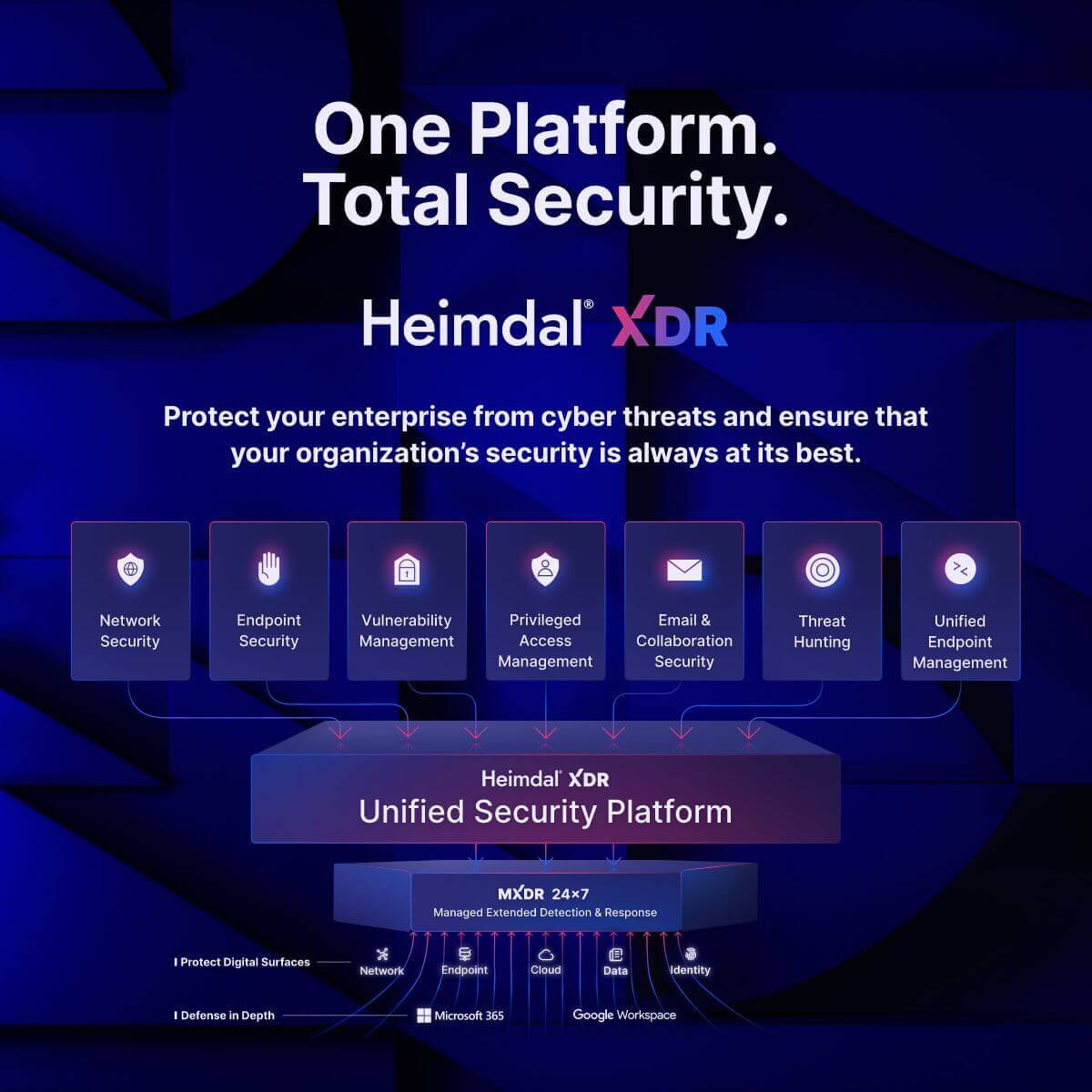
If you take the platform route, it looks like this.
One agent. One console. One contract.
- Patch and Asset Management for OS and third-party updates on Windows, macOS, and Linux, with Infinity Management for in-house software
- Privilege Elevation and Delegation Management (PEDM), Privileged Account and Session Management (PASM), and Application Control with AppFencing™
- Remote Desktop, BitLocker management, USB control, scripting, and PXE deployment
- DNS security for network and endpoint, next-gen antivirus with firewall, and ransomware encryption protection
- Email security and threat hunting
Every module reports into the same estate view.
We didn’t start as an RMM vendor either. The platform now covers day-to-day device management tasks like patching, remote desktop, scripting, and asset inventory.
How to choose UEM without drowning in demos
Do you need a separate UEM at all?
If you’re on Microsoft 365 E3 or E5, start with a gap analysis, not a vendor list. Write down what Intune can’t do for your fleet today. For many teams the list is short:
- Mac management depth
- third-party patching at scale
- remote support outside the Microsoft stack
- rugged or kiosk Android
Each item on that list can often be filled with a point product rather than a second UEM solution.
Signals that your current setup isn’t working
- Patch compliance reports need manual clean-up before anyone outside IT sees them.
- New starters wait more than a day for a working laptop.
- Your team logs into four or more consoles to answer “is this device healthy?”
- Users still hold local admin rights because removing them generates too many tickets.
- Nobody can say how many endpoint agents run on a standard laptop.
What mid-market teams underestimate
Re-enrolment. Moving Apple devices enrolled through Automated Device Enrollment, or Android Enterprise devices, to a new UEM platform usually means wiping or re-enrolling them. Plan the order of migration around that.
The real price. Add remote control, third-party patching, and analytics to the quote before comparing per-device figures. Omnissa, for example, sells several editions, and features such as remote support depend on the tier you buy.
Third-party catalogue depth. Ask for the exact list of supported applications and check it against your top 50 installed apps.
Unified, standalone or layered
Unified. Endpoint management and security sit in a single platform with one agent. It suits lean teams that want fewer consoles and accept that the platform may be stronger in some areas than others.
Standalone. You buy the best tool for each job. It suits large teams with the staff to integrate and run multiple tools.
Layered. You keep a core UEM platform, usually Intune, and add a specialist for the gap, such as Jamf for Macs or a security platform for patching, privilege control, and threat prevention. In practice, many Microsoft 365 organisations end up doing this.
What a UEM won’t fix
A UEM won’t detect a ransomware operator who is already moving through your network. It won’t replace identity governance, and it won’t compensate for a patch policy nobody enforces. Pair it with EDR or XDR for detection and response.
Where implementation breaks
- Identity integration with Entra ID, Okta, or Google is left until late, so conditional access policies fail at go-live.
- Patch rings are skipped, and the first bad update reaches every device at once.
- Legacy group policy and the new configuration profiles fight over the same settings.
- The management server itself goes unpatched. Treat it with the same scrutiny as any other privileged system.
How to run a proof of concept
Keep the pilot to four to six weeks and around 50 representative devices, including at least one Mac, one phone, and one awkward legacy machine. Score each vendor on:
- Zero-touch enrolment through Autopilot, Apple Business Manager, and Android Enterprise.
- Patch success rate for OS and third-party apps after two patch cycles.
- Time to answer five real audit questions from the built-in reports.
- Remote support quality on a slow home connection.
- Total quoted price with every add-on you needed during the pilot.
- Agent count and CPU impact on a standard laptop.
Best Unified Endpoint Management Software in 2026 – In Depth Comparison
We’ve checked the details below as of 14 October 2026, but vendors change pricing, features, and packaging often, so some entries may be out of date by the time you read this. We can’t guarantee they’re current, so check each vendor’s website before you decide.
We list Heimdal first because we publish this guide, and it’s a security platform rather than a full UEM. Each of the other nine tools was evaluated in at least one of the 2026 Gartner, IDC, or Forrester endpoint-management reports. Vendors that serve narrower needs, such as Hexnode and 42Gears for mobile and kiosk fleets, Iru for Apple-first companies, and Adaptiva for autonomous patching, aren’t profiled here. Pricing is US list price as of October 2026.
| # | Tool | Best for | Platforms | Pricing model |
|---|---|---|---|---|
| 1 | Heimdal | Security-led teams pairing with an MDM | Windows, plus macOS and Linux patching | Instant estimate from our pricing calculator |
| 2 | Microsoft Intune | Microsoft 365 E3/E5 organisations | Windows, macOS, Linux (limited distros), iOS, Android | Included in Microsoft 365 E3, E5, and Business Premium, or sold per user |
| 3 | Omnissa Workspace ONE | Large mixed and frontline fleets | Windows, macOS, Linux, iOS, Android, rugged | Published per-device editions |
| 4 | ManageEngine Endpoint Central | Mid-market and on-premises buyers | Windows, macOS, Linux, iOS, Android | Published starting prices, free edition for up to 25 endpoints |
| 5 | Ivanti Neurons for UEM | Ivanti ITSM customers | Windows, macOS, Linux, iOS and Android (EPMM) | Quote-based |
| 6 | IBM MaaS360 | Mobile-heavy, regulated organisations | Windows, macOS, iOS, Android | Published per-device editions, 30-day free trial |
| 7 | NinjaOne | Mid-market PC fleets plus MDM | Windows, macOS, Linux, iOS, Android | Quote-based, volume-tiered, 14-day trial |
| 8 | Tanium | Very large enterprise estates | Windows, macOS, Linux | Quote-based |
| 9 | HCL BigFix | Diverse regulated estates incl. UNIX | Windows, macOS, Linux, UNIX | Quote-based |
| 10 | Jamf | Apple-focused estates | macOS, iOS, iPadOS | Published per-device plans, sold via Jamf or resellers |
1. Heimdal XDR platform (security platform with endpoint-management modules)
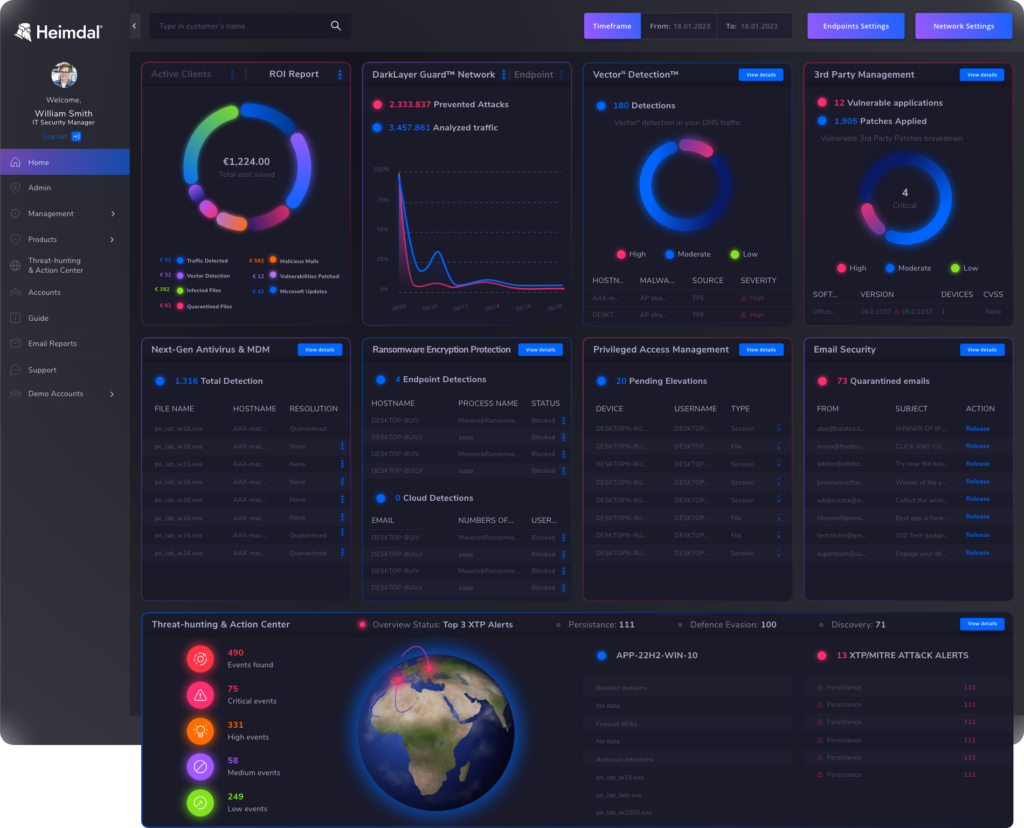
What it is. We’re a unified security platform with endpoint-management modules, not a full UEM. Our XDR platform manages and protects endpoint devices through several security layers in one console. Any module can be bought on its own, combined on the platform, or delivered with our managed SOC services. Patch and Asset Management is the module that overlaps most with UEM.
Best for. Security-led mid-market teams and MSPs that want patching, privilege management, application control, and threat prevention in one console, usually alongside Intune or another MDM for phones and tablets.
Strengths.
- One console. Patching, privilege management, application control, remote desktop, and threat prevention run from one console and one agent. Endpoint monitoring, patching, and security management happen in the same place.
- Cross-platform patching. Patch and Asset Management deploys OS and third-party software updates across Windows, macOS, and Linux, with automated deployment for 350+ third-party applications. Infinity Management extends that to in-house and custom software.
- Granular control. PEDM, PASM, and Application Control with AppFencing™ govern which applications run and who gets elevated rights. Remote Desktop, BitLocker management, USB control, scripting, and PXE deployment cover common device tasks.
- Threat intelligence. Our platform overview lists threat-intelligence enrichment from MITRE ATT&CK, OPSWAT, and Sigma rules.
- Integrations. RMM and PSA integrations let MSPs fit the platform into an existing stack.
- Compliance mapping. We map platform capabilities to NIS2, CIS, NIST, ISO 27001, DORA, and Essential Eight requirements, and we serve over 20,000 companies.
Our AI capabilities come in two forms. Predictive DNS uses AI and machine learning to identify malicious domains before threats materialise. AI-powered email fraud prevention flags impersonation and CEO fraud. Both are live today and predate our newer AI layer. That layer is AI Wingman, which works across the whole platform and is delivered in phases. AI Wingman Assist gives guidance inside the dashboard. AI Wingman Triage helps validate incidents and is included with Threat-hunting and Action Center (TAC). AI Wingman SOC speeds up our managed SOC and is included with TAC plus MXDR. For endpoint admins, AI Scripting generates scripts from natural-language prompts.
We’re referenced in Gartner’s Endpoint Protection coverage (May 2026), and we’re named as a representative vendor in Gartner’s Market Overview for Workspace Cybersecurity Platforms. We’re also in an active analyst relationship with Forrester. We did not take part in MITRE ATT&CK Evaluations Enterprise 2025. Our MITRE ATT&CK technique coverage is published on the Tidal Cyber Registry, so you can review it and add it to your proof-of-concept scorecard next to the other vendors on your list.
Trade-offs. We don’t offer full iOS or iPadOS MDM, so there’s no Automated Device Enrollment, configuration profiles, or managed app store. USB control and scripting are Windows features. We weren’t among the vendors evaluated in the endpoint-management analyst reports listed earlier in this guide.
Pricing. Our pricing calculator gives an instant estimate on the page and by email once you enter the modules you want and your endpoint count. See the Patch and Asset Management and XDR platform pages for module detail.
2. Microsoft Intune
What it is. Microsoft’s cloud UEM, built into Entra ID, Defender, and Windows Autopilot, and the default choice for Microsoft 365 organisations.
Best for. Microsoft 365 E3 or E5 organisations with mostly Windows fleets.
Strengths. Plan 1 is already included in Microsoft 365 E3, E5, and Business Premium, so many teams own it. From July 2026, E3 tenants receive Remote Help, Advanced Analytics, and Intune Plan 2, which adds Tunnel for MAM, firmware-over-the-air updates, and specialty device support. Microsoft gave 30 days’ notice in Message Center before the change landed. E5 also receives Endpoint Privilege Management, Cloud PKI, and Enterprise App Management. Intune is a Leader in both the Gartner Magic Quadrant and the Forrester Wave.
Trade-offs. Some users report weaker macOS and Linux depth than specialist tools, and slow policy and reporting refresh. Customers outside E3 and E5 still have to buy advanced features as add-ons.
Pricing. Plan 1 is included in Microsoft 365 E3, E5, and Business Premium, and in EMS, and it’s also sold standalone per user per month. Plan 2 and the Intune Suite are separate add-ons. Microsoft raised the list price of both E3 and E5 on 1 July 2026. For a closer look at what E3 covers on the security side, see our Heimdal and Microsoft 365 E3 comparison.
3. Omnissa Workspace ONE
What it is. An enterprise digital workspace that combines UEM, DEX analytics, virtual apps, and access management. Omnissa was formed from VMware’s end-user computing business after KKR’s acquisition from Broadcom closed in July 2024.
Best for. Large enterprises with mixed, frontline, and VDI requirements.
Strengths. Workspace ONE covers a wide range of devices, including rugged and frontline hardware. It’s a Leader in the Gartner Magic Quadrant. Omnissa states it ranked highest in all four Gartner Critical Capabilities use cases, with a 4.95 out of 5 score for Autonomous Endpoint Management. Omnissa announced Leader placements in four IDC assessments and is a Forrester Leader. Edition pricing is published, and Omnissa announced a DEX agent and a Workspace ONE Vulnerability Defense agent at Omnissa ONE in September 2026.
Trade-offs. The number of editions and add-ons makes packaging hard to compare. Reviewers often cite console complexity. Amit Singh became CEO on 28 September 2026, so get roadmap commitments in writing.
Pricing. Omnissa publishes per-device monthly rates for each edition, up to Platinum, on a 12-month prepaid basis with support included. Desktop Essentials excludes MDM. Per-user licences cover up to five devices.
4. ManageEngine Endpoint Central
What it is. Zoho’s UEM and endpoint security product, sold on-premises or as SaaS. It was called Desktop Central until 2022.
Best for. Mid-market and cost-conscious enterprises, and regulated organisations that need on-premises deployment.
Strengths. ManageEngine publishes starting prices. Endpoint Central patches Windows, macOS, Linux, and third-party apps, and offers an on-premises option. It’s a Gartner Challenger and an announced IDC Leader. ManageEngine reports Gartner Critical Capabilities scores of 4.40 for Autonomous Endpoint Management, 4.36 for Security-Centric, 4.25 for Frontline, and 4.10 for UEM. It also states it was the only vendor named Customers’ Choice in Gartner Peer Insights’ 2025 Voice of the Customer for Endpoint Management Tools.
Trade-offs. A dense interface and a learning curve come up often in user reviews. EDR, DEX, and OS deployment are paid add-ons. Mobile management is less specialised than mobile-first vendors.
Pricing. ManageEngine publishes starting per-endpoint prices and a configurator for its Professional, Enterprise, UEM, and Security editions. Price depends on edition, deployment type, endpoint count, and technician seats, with monthly, annual, and perpetual options. A free edition covers up to 25 endpoints. If you’re weighing other options, see our ManageEngine alternatives guide.
5. Ivanti Neurons for UEM, Endpoint Manager, and EPMM
What it is. A modular platform covering UEM, patching, DEX, ITSM, and mobile threat defence, sold as Neurons for UEM, Endpoint Manager (EPM), and Endpoint Manager Mobile (EPMM).
Best for. Existing Ivanti customers who need ITSM integration and already run disciplined patch governance.
Strengths. Ivanti has a long PC lifecycle history and a broad patch catalogue. ITSM integration is native, and Gartner placed Ivanti as a Visionary.
Trade-offs. CISA added three Ivanti EPM path-traversal flaws (CVE-2024-13159, CVE-2024-13160, and CVE-2024-13161) to its Known Exploited Vulnerabilities catalog on 10 March 2025. It added an EPM authentication bypass (CVE-2026-1603) on 9 March 2026. Two EPMM remote-code-execution flaws (CVE-2026-1281 and CVE-2026-1340) were also added in 2026. Check how quickly you can patch the management server and whether it needs to face the internet. Reviewers also cite product and naming sprawl and a dated interface.
Pricing. Quote-based and modular. See our Ivanti alternatives guide for comparable options.
6. IBM MaaS360
What it is. A SaaS UEM with AI analytics and a long mobile security history.
Best for. Mobile-heavy and regulated organisations that want SaaS management with mobile threat defence.
Strengths. IBM publishes its pricing and offers a 30-day free trial. Mobile threat defence is available as an add-on. MaaS360 is a Leader in the Gartner Magic Quadrant.
Trade-offs. Desktop management depth trails PC-focused tools. Some users report interface and speed problems.
Pricing. IBM publishes per-device monthly pricing for three editions (Essentials, Premier, and Enterprise), with a 30-day free trial. Check ibm.com for current promotions.
7. NinjaOne
What it is. SaaS endpoint management and RMM that now includes an MDM product. It sells to internal IT departments and MSPs.
Best for. Mid-market IT teams that want PC management and mobile management in one SaaS console.
Strengths. Reviewers praise its ease of use and fast deployment. NinjaOne is a Gartner Magic Quadrant Leader. NinjaOne states its government offering holds FedRAMP Moderate authorisation, and it offers free onboarding, unlimited support, and a 14-day trial.
Trade-offs. The MDM product is younger than those of mobile specialists. Some users report patch status that stays “pending” or “failed” across many devices.
Pricing. Quote-based. Per-device pricing falls as endpoint count rises, and NinjaOne publishes indicative ranges. A 14-day trial is available. If you’re weighing other options, see our NinjaOne alternatives guide.
8. Tanium
What it is. Real-time autonomous endpoint management for large estates, used by both IT operations and security teams.
Best for. Large enterprises and government bodies with close IT and security alignment.
Strengths. Tanium queries endpoints in real time at scale rather than waiting for periodic check-ins, and automates patching and compliance. It’s a Gartner Magic Quadrant Leader and a Forrester Leader, and it announced a Leader placement in IDC’s Windows client endpoint management assessment.
Trade-offs. In practice, it suits very large estates. Mobile device management isn’t its main focus, so many customers pair it with an MDM.
Pricing. Quote-based.
9. HCL BigFix
What it is. Large-scale patching, compliance, and lifecycle management across many operating systems, including legacy UNIX.
Best for. Large regulated enterprises with diverse server and desktop estates.
Strengths. BigFix covers a wide OS range, automates through content packs, and supports on-premises and air-gapped deployment. HCLSoftware announced an IDC Leader placement and is a Gartner Magic Quadrant Leader.
Trade-offs. Reviewers point to a dated interface and infrastructure overhead. Mobile management is secondary.
Pricing. Quote-based.
10. Jamf
What it is. Apple-specialist device management and security.
Best for. Apple-heavy organisations and education.
Strengths. Jamf states it supports new Apple OS releases on day one. It announced IDC Leader placements in the worldwide UEM, Apple, and frontline/IoT assessments, and it’s a Gartner Magic Quadrant Leader.
Trade-offs. Jamf’s device management is Apple-focused, so mixed estates need a second tool for Windows. Francisco Partners took Jamf private on 30 January 2026 in a deal worth about $2.2B, so packaging and roadmap may change.
Pricing. Jamf publishes per-device pricing for its Mac and mobile plans, billed annually with a 25-device minimum, and sells through Jamf or authorised resellers.
Choosing by situation
There’s no single best unified endpoint management software for every estate, so start from the fleet you actually run.
- Your gap is security, not device enrolment. Keep your UEM and add the Heimdal XDR platform for patching, privilege management, application control, and threat prevention.
- You’re on Microsoft 365 E3 or E5 with mostly Windows devices. Start with Intune, check what the July 2026 bundle now covers, and add point products for the remaining gaps.
- You manage a large mixed estate with frontline devices and VDI. Shortlist Omnissa Workspace ONE. Compare it with Tanium if real-time visibility for security teams matters as much as device management.
- Budget and on-premises deployment decide it. ManageEngine Endpoint Central and HCL BigFix both support on-premises deployment, and ManageEngine publishes starting prices.
- Most of your devices are Apple. Jamf is the established choice.
- Most of your devices are phones, tablets, or kiosks. Start with IBM MaaS360, and compare it with Omnissa Workspace ONE if rugged and frontline devices are part of the mix.
- You want PC management and MDM in one SaaS tool with fast setup. NinjaOne is built for that combination.
- You already run Ivanti ITSM. Ivanti keeps service and endpoint data together, provided you can patch its management servers quickly.
Simplify your endpoint management and security today
Unified Endpoint Management software makes it easy to manage devices, boost security, and adapt to modern setups like BYOD and hybrid teams.
Most UEM tools focus only on device management, but solutions like Heimdal take it further by adding advanced cybersecurity features.
With a single platform for endpoint management and security, you can cut costs, simplify operations, and stay protected against evolving threats. Whether you’re handling laptops, IoT devices, or mobile phones, choosing the right UEM solution keeps your business secure, efficient, and future-ready.
Frequently asked questions
What is UEM software?
UEM software manages Windows, macOS, Linux, ChromeOS, iOS, Android, and rugged devices from one console and one policy model. Core functions are enrolment, configuration and compliance policies, software deployment, OS and third-party patch management, inventory, remote lock and wipe, and identity and access management integration for conditional access. For a longer introduction, see Unified Endpoint Management (UEM) explained.
What is the difference between MDM, EMM, and UEM?
MDM controls phones and tablets with lock, wipe, and policy settings. EMM adds mobile application management, content management, and identity. UEM extends that model to desktops, laptops, and servers. All three are available both on-premises and as SaaS, so delivery model isn’t a dividing line between them.
What is the difference between UEM and RMM?
Remote monitoring and management (RMM) tools such as NinjaOne, Datto RMM, N-able, and Atera focus on monitoring, scripting, patching, and remote control of PCs and servers, often for MSPs. Mobile management depth varies. NinjaOne now sells an MDM product, while Datto RMM has only recently added Apple MDM and relies on Intune for Android. A UEM treats phones and tablets as first-class devices from the start.
What is the difference between UEM and EDR or XDR?
A UEM keeps devices configured, patched, and compliant. EDR and XDR detect and respond to active threats. Most organisations need both, and unified endpoint management solutions increasingly integrate with an EDR or XDR product rather than trying to replace it.
How much does UEM software cost?
UEM pricing falls into three models in October 2026. Omnissa, IBM, Jamf, ManageEngine, and Microsoft publish rates or starting prices. NinjaOne publishes indicative ranges. Tanium, HCL BigFix, and Ivanti quote individually. Intune Plan 1 is included in Microsoft 365 E3, E5, and Business Premium. Compare totals with every add-on you need, not headline per-device prices.
Can Heimdal replace our UEM?
For Windows-heavy estates, we cover patching, remote desktop, scripting, BitLocker, USB control, privilege management, and application control. We don’t offer full iOS or iPadOS MDM, so most teams with phones and tablets keep Intune, Jamf, or another MDM and run Heimdal alongside it. Our pricing calculator gives an instant estimate for the modules you choose.
If you liked this article, follow us on LinkedIn, Reddit, X, Facebook, and Youtube.


