



Contents:
If you’re evaluating patch management alternatives to Action1, you’re likely in one of two places. Action1 isn’t meeting your needs at current scale or OS complexity, or you’re shortlisting tools and want to understand the real differences before you commit.
This guide gives you a direct answer to both.
The bottom line
Quick-reference shortlist for teams in different situations:
- Heimdal Patch & Asset Management: for mid-market and enterprise teams that want security-grade patching with fast deployment, compliance-ready audit trails, and the option to expand into a unified security platform over time. Available as a standalone product.
- Action1: for Windows-primary organisations from SMB up to a few thousand endpoints that want cloud-native patching with a free tier for up to 200 endpoints and built-in vulnerability context.
- Automox: for cloud-first teams that want dedicated cross-platform patching at the lowest published per-endpoint entry price, without needing broader RMM capabilities.
- ManageEngine Patch Manager Plus / Endpoint Central: for larger enterprises and regulated industries that need mature multi-OS patching, structured approval workflows, and the option for on-premises deployment.
- NinjaOne: for mid-market IT teams that want a single platform combining remote monitoring, endpoint management, and patching, rather than a dedicated patch tool.
- Atera: for lean IT teams where per-technician pricing works and consolidation matters more than maximum patch reliability at scale.
- Datto RMM: for organisations already invested in the Datto/Kaseya platform that need mature Windows patch automation and accept higher configuration overhead.
- Pulseway: for small IT teams that want mobile-friendly endpoint management, basic patching, and a low entry cost.
How the category has changed
Three years ago, most patch management software conversations started with “how do we move off WSUS?” That question is largely settled. Cloud-native SaaS delivery is now the default expectation for any new procurement.
Today’s conversations are more specific, and more demanding.
Third-party applications are now the primary exposure. Browsers, productivity tools, developer utilities, and PDF readers are consistently among the most actively targeted software categories in real-world breach data. Operating system patching addresses one layer. The third-party patch management layer is where most organisations still have gaps.
The CVE exploitation window has compressed. The window between vulnerability disclosure and active exploitation has narrowed considerably over recent years. CISA’s Known Exploited Vulnerabilities catalogue (and the BOD 22-01 mandate for federal agencies) has created a formal expectation of near-immediate patching for listed vulnerabilities. Many regulated enterprises treat the KEV list as a practical framework even without the federal mandate — and vulnerability prioritisation has become a core operational discipline as a result.
Compliance frameworks have sharpened their requirements. PCI DSS v4.0, NIS2, HIPAA, and Cyber Essentials all impose explicit, auditable obligations around timely patching. A patch status dashboard is no longer sufficient as compliance evidence. Auditors want structured logs: when a vulnerability was identified, when the patch was deployed, on which endpoints, and what happened to exceptions.
The market has split into two models. Patch-specialist tools (Action1, Automox, Heimdal) prioritise depth in patching, vulnerability intelligence, and compliance reporting. Broader RMM platforms (NinjaOne, Datto RMM, ManageEngine Endpoint Central) include patching alongside monitoring, remote access, and device management. Neither model is universally better. The right fit depends on what your team actually lacks.
Where traditional approaches fall short
Moving off WSUS is now a settled decision for most organisations — but the limitations of WSUS explain why. It addresses Windows OS updates in well-maintained on-premises environments, and for many organisations it was entirely adequate until it wasn’t. The limitations are predictable.
Third-party applications are out of scope. A critical browser vulnerability has nothing to do with WSUS. Neither does a Java exploit or a remote access client with a known flaw.
Remote endpoints fall through. Cloud-native agents solve the distribution problem by design. WSUS was built for a world where devices connected to a corporate network regularly. That world has largely gone.
Compliance documentation is inadequate. WSUS measures whether patches were offered, not whether they were successfully installed. The gap matters when you’re responding to an auditor.
macOS and Linux aren’t covered. For organisations running mixed estates, WSUS is incomplete by design, not by accident.
RMM patching modules close some of these gaps but introduce their own. Bundled patching in platforms like ConnectWise or older Datto deployments often trails dedicated tools in third-party application coverage, failure reporting quality, and vulnerability intelligence integration.
Many teams accept “good enough” patching from their RMM without auditing whether it actually performs at the level they assume.
In breach post-mortems involving known vulnerabilities, the same two failure modes appear consistently. The patch existed but wasn’t deployed in time, or the team didn’t have real-time visibility into which endpoints were affected. Better tooling addresses both directly.
Heimdal Patch & Asset Management is security-first framing
Most patching tools treat updates as an IT housekeeping operation. We treat them as a security operation.
This distinction shows up in how we’ve built the product. Every patch package is tested, repackaged, and delivered via encrypted HTTPS before deployment. Patches are available for deployment within four hours of release. The audit trail tracks CVE and CVSS data alongside patch history, not just deployment timestamps.
Standalone or platform: both are genuine options. Heimdal Patch & Asset Management is available as a standalone product. You don’t need to purchase or adopt the broader Heimdal XDR platform to use it. For teams with a specific patching gap, it’s evaluable and deployable on its own merits.
For teams that want to expand over time, our Patch & Asset Management module sits within a broader security platform that also includes DNS security at network and endpoint level, privileged access management (PAM), next-generation antivirus, ransomware encryption protection, email security, application control, and a threat-hunting console. We protect over 3 million endpoints globally, with 17,000+ customers.
In practice, a team that starts with us for patching can add DNS security, PAM, or endpoint protection from the same console as their security posture matures. No migration required.
This matters for security teams told to “find a patch tool” but also under pressure to reduce tool sprawl and get more coverage from fewer vendors. We address both objectives. Whether you start with patching alone or as part of a broader unified XDR platform, the architecture supports both paths.
Practical buyer guidance
Do you actually need a dedicated patch management tool?
Probably yes, if: – Your current tool can’t reliably tell you which third-party applications are unpatched across your estate – You have macOS or Linux endpoints your current patching process doesn’t cover – Your compliance reports don’t map to the specific frameworks your auditors require – A cyber insurance underwriter or internal audit has flagged patching posture as a gap – You’ve experienced patch failures that went undetected until the next scan cycle
You may be fine with what you have, if: – Your environment is Windows-only, under 200 endpoints, with no regulated compliance obligations – Your current tooling has passed audits, covers third-party applications reliably, and surfaces failures accurately
What mid-market teams consistently underestimate
The “we have patching” assumption. Third-party applications, remote endpoints, and macOS or Linux machines are the most common gaps. Most organisations believe their patch coverage is better than it is until they run a proper audit against a CVE that affects a third-party application.
Patch failure rates. A patch showing as “deployed” in a dashboard isn’t the same as a patch installed on a live endpoint. Ask any vendor you evaluate: how does the tool surface failed deployments? What’s the retry behaviour? How quickly would you know if 15% of deployments silently failed?
The compliance reporting gap. Patch status dashboards and compliance-grade audit documentation aren’t the same thing. If your tool can’t produce a structured, CVE-linked report showing when a vulnerability was identified, when the patch was deployed, and which endpoints were exceptions, it won’t satisfy a formal audit. Test the actual report output, not just the dashboard.
Standalone vs. integrated vs. unified platform
Standalone patch tool: Maximum depth in patching specifically. Requires integrating with your existing ITSM, monitoring, and reporting stack. Best for teams with a clear, isolated patching gap.
Patch module within a broader RMM: Reduces vendor count and simplifies IT operations. The risk is that patching depth may trail what a specialist tool offers. NinjaOne and Datto RMM sit here. Verify the specific capability you need rather than accepting “we include patching” at face value.
Unified security platform with patching included: Heimdal and ManageEngine Endpoint Central sit closest to this model. Patching is one module in a broader security stack. The advantage is integrated context: a vulnerability flagged in patching can inform access control decisions, and compliance reporting draws from a single data model. Heimdal specifically lets you start with just the Patch & Asset Management module and expand from there.
What patch management won’t fix
- Misconfigured systems. Patching closes known software vulnerabilities. Open ports, overprivileged accounts, and misconfigured services remain.
- Zero-day vulnerabilities. By definition, no patch exists at the moment of exploitation for a zero-day. Layered defences still matter.
- Insider threats and credential abuse. Patching is one layer. PAM, application control, and endpoint detection address different attack vectors.
- Process failures. If your change management process blocks timely deployment, a better patching tool won’t solve that. Organisational constraints are often a larger barrier than tooling.
How to run a PoC without drowning in demos
- Define your baseline first. Before any vendor demos, audit what your current tool actually covers: which third-party applications, which OS types, what your failure rate is on remote endpoints.
- Test in your environment, not a vendor sandbox. Focus on your most problematic endpoint types: remote laptops, macOS machines, any Linux servers.
- Test failure visibility deliberately. Block a test endpoint from reaching the internet mid-patch cycle and observe how the tool surfaces the failure.
- Pull a real compliance report. Generate the actual output and assess whether it would hold up in an audit for your specific frameworks.
- Test rollback. Especially for high-risk deployments, verify that rollback works as described, not just as marketed.
- Evaluate customer support responsiveness. During the PoC, raise a support case. Response time and solution quality are telling indicators of what production support will look like.
Action1: the baseline
What it is: Cloud-native endpoint and patch management platform. No on-premises servers, VPN, or distribution infrastructure required. Endpoints communicate directly with Action1’s cloud via a lightweight agent-based architecture.
Best for: Windows-primary organisations from SMB up to a few thousand endpoints that want cloud-native patching with built-in vulnerability context and the option to start without a financial commitment.
Key strengths:
- Free for the first 200 endpoints with full feature parity and no time limit. According to Action1’s official announcement, the free tier was expanded from 100 to 200 endpoints in February 2025. Free-tier users receive community support only.
- CVE, CVSS, and CISA KEV correlation built into the patch workflow, giving analysts vulnerability context alongside remediation actions
- G2 Leader status in patch management and endpoint management categories, confirmed for Winter 2026 and Fall 2025 reporting periods per Action1’s published announcements. Approximately 4.9/5 across over 1,000 reviews as of early 2026.
- Strong Windows patch management: OS patching and third-party applications in one console
- Cloud-native architecture. No VPN dependency for remote endpoint coverage.
- Real-time patch status visibility across the endpoint fleet, with live dashboards showing deployment progress and failures
Trade-offs:
- macOS third-party application catalogue is narrower than the Windows equivalent
- Linux support now covers multiple distributions including Debian, Ubuntu, RHEL 8/9/10, SUSE Linux Enterprise Server, and openSUSE, per Action1’s current product documentation. Verify coverage for your specific distribution before evaluation.
- Does not support offline or air-gapped environments
- Advanced custom reporting and deep ITSM integrations are less mature than those of established enterprise platforms
- Per-endpoint pricing scales. Model total cost carefully for deployments above 1,000 endpoints.
Pricing: Free for the first 200 endpoints (full features, no time limit, community support only). Multiple third-party review sources indicate paid tiers start at approximately $4 per endpoint per month beyond the initial 200 allocation, with a separate mandatory support fee. Verify current pricing directly with Action1.
The alternatives
Heimdal Patch & Asset Management
What it is: Security-centric patch management solution and software asset tracking platform. Available as a standalone product or as the vulnerability management module within Heimdal’s unified XDR security platform.
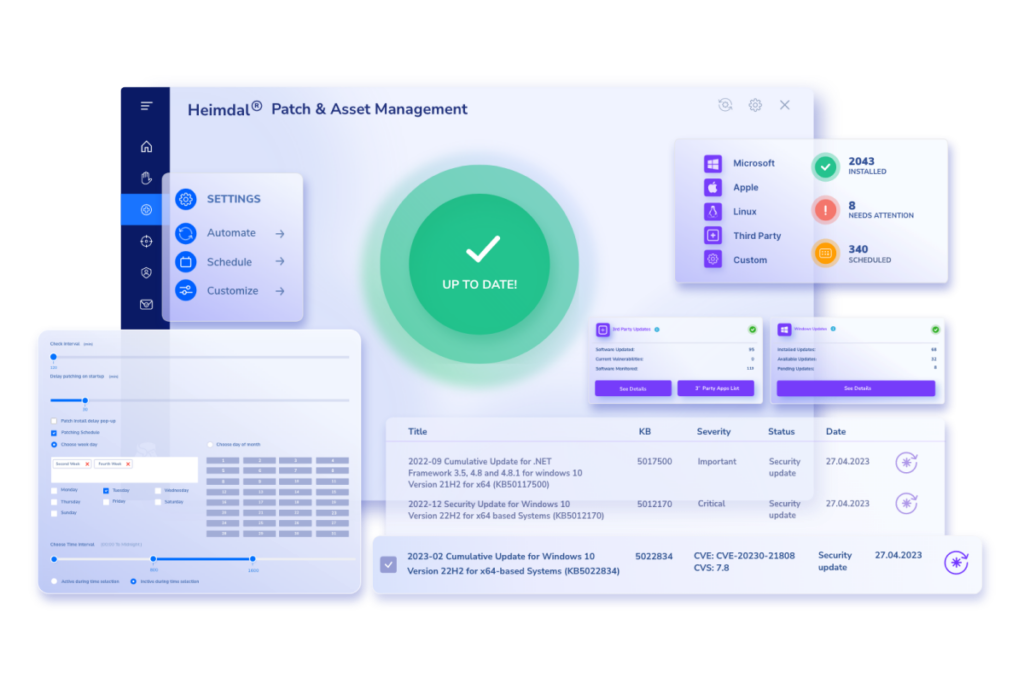
Best for: Mid-market and enterprise teams that need compliance-grade patching across Windows, macOS, and Linux. Teams that want patches treated as a security operation rather than an IT task, with the option to expand toward a broader security platform over time.
Key strengths:
- Patches deploy within four hours of release. Every package is tested, repackaged, and delivered via encrypted HTTPS before deployment.
- Cross-platform coverage: Windows, macOS, Linux (Debian and Ubuntu), and over 350 third-party applications
- The Infinity Management add-on extends automated patch management and software deployment to custom in-house software using command-line scripting
- CVE and CVSS tracking in the audit trail, with compliance reporting mapped to GDPR, NIST, NIS2, and Cyber Essentials frameworks
- P2P bandwidth optimisation for large distributed deployments
- Configurable schedules, priority-based deployment, rollback capability, and software inventory management (supporting NIST CM-7 compliance)
- Real-time patch status monitoring across distributed endpoints, with automated alerts on deployment failures
- Our data shows automated patching reduces manual effort by approximately 70%, with ROI achieved within approximately two months compared to seven months with traditional approaches. Use the Patch Management ROI Calculator to model your own numbers.
- When deployed as part of our XDR platform, patching integrates directly with DNS security, PAM, endpoint protection, and the threat-hunting console, creating a unified operational view
- Our AI Wingman roadmap includes AI/ML-driven patch sequencing that would prioritise remediation impact within limited service windows (listed as upcoming in our AI capabilities documentation as of mid-2026 — check with us for current status)
Trade-offs:
- No fixed published rate card. Use our pricing calculator to get a figure based on your environment. Early-stage cost comparison is straightforward from there.
- We’re not a full RMM platform. Teams needing built-in network monitoring, ticketing, or remote control will need our Remote Desktop module or a separate RMM.
- Linux support for Debian and Ubuntu is confirmed. Verify Red Hat or SUSE coverage with us directly before evaluation.
- Some user reviews note the reporting interface could be more intuitive. Overall satisfaction remains high on review aggregators, at approximately 4.7/5 on Capterra as of mid-2026.
Pricing: Get pricing via our pricing calculator. Pricing is generated based on your environment.
NinjaOne
What it is: Unified RMM platform with patch management as a core integrated module, alongside monitoring, remote access, scripting, backup, alerting, and MDM.
Best for: Mid-market IT teams that want one platform for endpoint operations rather than a dedicated patch tool. A strong fit for teams consolidating away from multiple point products.
Key strengths:
- Cross-platform patching (Windows, macOS, Linux) with a strong reputation for patch reliability in user reviews
- Modern, intuitive interface that consistently scores well for usability across review platforms
- Broader operational platform than pure-play patch tools: remote control, monitoring, scripting, and backup in one console
- Strong endpoint management capabilities across mixed OS environments
Trade-offs:
- All-in-one bundling means paying for capabilities you may not need if patching is your only gap
- Less built-in vulnerability intelligence than patch-specialist tools. CVE/KEV correlation depth is shallower than in dedicated patch-specialist tools.
- Pricing is fully quote-based. Third-party review analysis suggests approximately $3.75 per endpoint per month at around 50 endpoints, declining with volume. Treat as directional only.
Pricing: Quote-based. Contact NinjaOne for current pricing.
Automox
What it is: Cloud-native, policy-driven patch management platform covering Windows, macOS, and Linux. Built as a cloud-first alternative to WSUS and SCCM-based workflows.
Best for: Cloud-first organisations that want dedicated cross-platform patching with strong automation and don’t need the broader operational tooling of a full RMM.
Key strengths:
- Lowest published entry price among cloud-native patch tools for OS-only patching
- Genuine cross-platform support with a cloud-native architecture
- Strong workflow automation and policy controls for distributed endpoint fleets
- Transparent base-tier pricing simplifies initial cost comparison
Trade-offs:
- The $1 per endpoint per month entry tier covers OS patching only. Third-party application coverage and advanced automation are in higher, quote-based tiers. Budget accordingly. Total cost for a realistic feature set is meaningfully higher than the entry price.
- No native monitoring, MDM, or ticketing.
Pricing: Published entry tier starts at $1 per endpoint per month (OS patching only, annual commitment) per Automox’s public pricing page as of mid-2026. Third-party application coverage and advanced automation require higher, quote-based tiers. Verify with Automox.
ManageEngine Patch Manager Plus / Endpoint Central
What it is: ManageEngine offers a dedicated patch management product (Patch Manager Plus) and a broader endpoint management suite (Endpoint Central, formerly Desktop Central). Both are mature and well-suited to compliance-driven environments.
Best for: Larger enterprises and regulated industries that need multi-OS patching at scale, structured approval workflows, detailed compliance reporting, and flexibility between cloud and on-premises deployment.
Key strengths:
- According to ManageEngine’s product documentation, coverage spans 1,100+ third-party applications
- Rich deployment controls: approval stages, test rings, rollback, granular maintenance windows
- Strong compliance and audit reporting, with consistent performance in regulated environments
- Transparent, tiered pricing with published rate cards
- On-premises, cloud, and hybrid deployment options for organisations with data residency or compliance requirements
Trade-offs:
- More complex interface and higher configuration overhead than simpler SaaS tools
- On-premises deployment requires ongoing infrastructure management
- Licensing across modules (patching, MDM, remote control, asset management) can become complex at scale
Pricing: According to ManageEngine’s published pricing, Patch Manager Plus starts at approximately $345 per year (on-premises) or $445 per year (cloud) for up to 50 computers and one technician. Endpoint Central (cloud) starts at approximately $795 per year for 50 endpoints. Verify with ManageEngine directly before procurement, as list prices are updated without notice.
Atera
What it is: All-in-one RMM and PSA platform with per-technician pricing covering unlimited endpoints, targeting lean IT teams.
Best for: IT teams where per-technician pricing works commercially and platform consolidation (RMM, PSA, patching, remote access) is the primary objective. Run a thorough PoC before committing.
Key strengths:
- Per-technician pricing model with unlimited endpoints is commercially attractive at high device-to-technician ratios
- Integrated RMM, PSA, patch management, and remote access in a single platform
- AI-powered automation features for scripting and basic remediation tasks
Trade-offs:
- Review aggregations on G2 show recurring patterns of unreliable patch management: missed critical updates, unclear error messages on failed deployments, and weak status reporting
- Agent reliability issues are reported more frequently at larger deployment sizes
- macOS third-party patching is less comprehensive than leading competitors per comparative review analysis
- Outcomes vary considerably with deployment size, OS mix, and configuration depth. A thorough proof of concept in your specific environment is strongly recommended before purchase.
Pricing: Starts at $149 per technician per month (billed annually) per the current published rate. Verify current pricing directly with Atera.
Datto RMM
What it is: Mature cloud RMM platform, now part of the Kaseya ecosystem, with a history of deployment by managed service providers and in-house IT teams alike.
Best for: Organisations already running Datto/Kaseya tooling that need mature Windows patch automation and are prepared for higher configuration overhead.
Key strengths:
- Mature Windows patch workflows with solid automation, scheduling, and approval policies
- Deep integration with the Datto/Kaseya product ecosystem
- Strong community scripting resources for patch automation
Trade-offs:
- Historically strongest for Windows patching. macOS and Linux coverage tends to trail dedicated cross-platform tools. Verify current capabilities against your actual environment.
- Higher configuration and onboarding overhead than simpler tools
- Product roadmap and pricing are subject to Kaseya’s broader corporate decisions, a risk factor noted in practitioner community discussions
- No publicly listed pricing
Pricing: Quote-based. Contact Datto/Kaseya for current pricing.
Pulseway
What it is: All-in-one IT management platform for small to mid-sized organisations, with mobile-first management as a defining feature.
Best for: Small IT teams that want basic patching and endpoint management with mobile access, at a low entry cost. Not suited to regulated industries with formal audit requirements.
Key strengths:
- Administrators can monitor alerts and take actions from a smartphone
- Integrated patch management, endpoint monitoring, and remote access in a single console
- Low entry cost for small environments
Trade-offs:
- Limited feature depth compared to enterprise platforms: fewer advanced approval workflows and a narrower third-party application catalogue
- Community feedback patterns include reliability issues and limited compliance reporting capabilities
- Not designed for regulated environments with formal audit or framework-mapping requirements
Pricing: Verify current pricing directly with Pulseway. Published figures vary across sources and billing periods. Treat any third-party price references as directional only.
Closing decision guide
Choose Heimdal Patch & Asset Management if:
You want patching treated as a security function, with encrypted delivery, compliance-grade audit trails, and CVE/CVSS tracking built in. Your estate includes Windows, macOS, and Linux. You need reports mapped to GDPR, NIST, NIS2, or Cyber Essentials. And you want the option to expand toward DNS security, PAM, endpoint protection, or a full unified security platform over time, without switching vendors or migrating data.
Choose Action1 if:
You’re primarily Windows-based, have 200 endpoints or fewer (or want to evaluate risk-free with the free tier), and need fast, cloud-native patching with built-in KEV context. Good fit for teams moving off WSUS without a large upfront commitment.
Choose Automox if:
Cross-platform OS patching at the lowest published per-endpoint entry price is the priority. Your team handles monitoring, remote access, and ticketing through other tools.
Choose ManageEngine if:
You’re in a regulated environment, need on-premises deployment as an option, require structured multi-stage approval workflows, and have the IT capacity to manage a more complex tool with a high application catalogue ceiling.
Choose NinjaOne if:
You want a single platform for remote monitoring, endpoint management, and patching. Patching is one of several operational requirements you’re consolidating, not the only one.
Choose Atera if:
Per-technician pricing works better than per-endpoint pricing at your scale, and consolidating RMM, PSA, and patching in one platform outweighs concerns about patch reliability variance. Run a thorough PoC first.
Choose Datto RMM if:
You’re already within the Kaseya ecosystem and the cost of introducing a separate patching tool outweighs the capability gap.
Choose Pulseway if:
You’re a small team with basic patching needs, want mobile-friendly management, and have minimal compliance reporting obligations.
Also worth evaluating: PDQ Deploy, if your environment is Windows-centric and you want a lightweight, IT-operations-focused tool for software deployment and patch automation without broad RMM overhead. PDQ is a well-established option for Windows-heavy teams that want simplicity over platform breadth.
Frequently asked questions
What is patch management, and why does it matter more now than it used to?
Patch management solution is the structured process of identifying, testing, deploying, and verifying software and firmware updates across an organisation’s endpoints. It matters more now because the exploitation window between vulnerability disclosure and active attacks has compressed significantly in recent years. CISA’s Known Exploited Vulnerabilities catalogue formalises the urgency. Regulatory frameworks including PCI DSS v4.0, NIS2, HIPAA, and Cyber Essentials create explicit, auditable obligations around timely patching that organisations face increasing pressure to demonstrate.
How do automated tools improve outcomes compared to manual patching?
Automation addresses two core failure modes. First, delayed deployment. Manual processes require staff time and generate scheduling backlogs. Our data shows automated patching delivers patches within four hours of release, compared to an average of 16 days with traditional methods. Second, coverage gaps. Automated tools maintain persistent agent contact with endpoints and report failures in real time, rather than relying on periodic manual checks.
My RMM already includes patching. Why would I evaluate a dedicated tool?
RMM patching modules vary significantly in third-party application catalogue depth, failure visibility, vulnerability intelligence, and compliance reporting quality. If your RMM can’t reliably tell you which third-party applications are unpatched across your full estate, can’t surface failed deployments accurately, or can’t produce audit-ready compliance documentation, a dedicated tool addresses a real gap your current setup can’t fill. Tools like Action1, Heimdal, and Automox exist precisely to fill this gap for teams whose RMM patching hasn’t kept pace with their needs.
What should I look for in compliance-grade patch reporting?
Look for four things. Framework-mapped output (GDPR, HIPAA, NIST 800-53, PCI DSS v4.0 as applicable), complete CVE and CVSS tracking in the audit trail, documented exception handling, and rollback capability. ManageEngine and Heimdal both score consistently well on compliance reporting in user review aggregations. Test the actual report output, not just dashboard screenshots.
Does patch management replace endpoint detection or antivirus?
No. Patch management reduces the attack surface by closing known vulnerabilities. It doesn’t detect active threats, stop fileless attacks, or prevent credential theft. Patch management and vulnerability management are different layers — both matter for a complete defence. Unpatched systems are a distinct risk category from inadequately detected systems.
What are the real risks of not patching on time?
Known, patchable vulnerabilities are consistently identified as entry points in post-incident analyses. Beyond direct security risk, delayed patching creates compliance exposure. Documented failure to patch known vulnerabilities can trigger regulatory findings under HIPAA and PCI DSS frameworks, for example. Cyber insurance underwriters increasingly scrutinise patch posture at renewal and may condition coverage or pricing on a demonstrable patch management process.
How long should a patch management proof of concept take?
Four to six weeks is usually sufficient for a meaningful evaluation, provided you define clear criteria upfront. The most important criteria are coverage of your specific third-party applications, behaviour on your most problematic endpoint types (remote laptops, macOS, Linux servers), failure visibility, compliance report quality, and rollback reliability. Test against your actual environment, not a clean demo setup.
Can Heimdal Patch & Asset Management be used without adopting the full Heimdal platform?
Yes. According to Heimdal’s product positioning, Patch & Asset Management is available as a standalone module. Teams that want dedicated security-grade patching without changing their broader security stack can evaluate and deploy it independently. The unified platform integration is an option, not a requirement.
How do I simplify the vendor selection process when comparing multiple tools?
Start by defining your must-haves: OS coverage, third-party application depth, compliance reporting format, and deployment model (cloud vs. on-premises). Then use those criteria to eliminate vendors before entering any demo. Running a structured PoC against a fixed set of tests, rather than a vendor-led walkthrough, makes it much easier to compare like-for-like and simplify the final decision.
Pricing data reflects information available as of mid-2026 from vendor websites and independent review sources. All pricing should be verified directly with vendors before procurement decisions.


